In the realm of computing, memory plays a vital role in ensuring smooth and efficient operations. Whether you’re building a desktop PC for gaming or managing a server for enterprise-level applications, choosing the right type of memory is essential for optimal performance. In this comprehensive breakdown, we’ll explore the differences between desktop and server memory, shedding light on their unique characteristics, applications, and considerations. So, let’s dive in and unravel the mysteries of desktop vs. server memory.
1. Purpose and Workloads:
One of the primary distinctions between desktop and server memory lies in their intended purposes and workloads. Desktop memory is designed for consumer-grade computers used for personal or professional tasks such as web browsing, multimedia consumption, productivity applications, and gaming. On the other hand, server memory is specifically tailored for enterprise-level servers tasked with handling heavy workloads, mission-critical applications, virtualization, databases, and high-performance computing (HPC) tasks.
2. Performance Requirements:
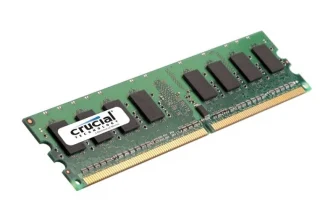
Desktop memory typically focuses on delivering high-speed performance for everyday computing tasks and gaming experiences. These modules often feature lower capacities and prioritize low latency and fast data transfer rates to ensure snappy responsiveness and smooth multitasking. In contrast, server memory prioritizes reliability, scalability, and stability over sheer speed. Server-grade DIMMs (Dual In-Line Memory Modules) are optimized for 24/7 operation in demanding environments, offering higher capacities, ECC (Error-Correcting Code) support, and advanced reliability features to handle complex workloads with minimal downtime.
3. Capacity and Scalability:
Desktop memory modules typically come in lower capacities compared to server memory, with most consumer-grade systems supporting up to 64GB or 128GB of RAM. These capacities are well-suited for typical desktop applications and gaming scenarios, providing ample room for multitasking and content creation. In contrast, server memory modules can scale up to hundreds of gigabytes or even terabytes of RAM per server, allowing for massive memory configurations to accommodate large databases, virtual machines, and enterprise applications.
4. Error Correction and Reliability:
ECC (Error-Correcting Code) is a critical feature found in server memory but not commonly available in desktop memory. ECC RAM can detect and correct single-bit errors in real-time, enhancing data integrity and system stability, which is essential for mission-critical applications and data-sensitive environments. Server-grade DIMMs also undergo rigorous testing and validation processes to ensure maximum reliability and compatibility with a wide range of server platforms, minimizing the risk of memory-related failures or system crashes.
5. Form Factors and Compatibility:
Desktop memory modules typically adhere to standard form factors such as DIMM (Dual In-Line Memory Module) or SO-DIMM (Small Outline Dual In-Line Memory Module) and are compatible with consumer-grade motherboards based on industry-standard specifications like DDR4 or DDR5. These modules are readily available in retail channels and come in various configurations to suit different system requirements and budgets. Server memory, on the other hand, often comes in specialized form factors such as RDIMM (Registered DIMM) or LRDIMM (Load-Reduced DIMM) and is tailored for compatibility with server-class motherboards and processors from leading vendors like Intel and AMD.
6. Price and Value Proposition:
Desktop memory modules are generally more affordable than their server counterparts, reflecting the differences in performance, reliability, and scalability. Consumers seeking to upgrade their desktop PCs or build custom gaming rigs can find a wide selection of desktop memory options at competitive price points, offering excellent value for their computing needs. In contrast, server memory tends to command higher price premiums due to its specialized features, ECC support, and stringent quality assurance processes, making it a significant investment for businesses and organizations seeking robust infrastructure solutions.
7. Future-Proofing and Upgradeability:
When considering memory upgrades or future-proofing your system, it’s essential to factor in scalability and compatibility. Desktop memory modules offer flexibility in terms of upgrade options, allowing users to incrementally add or replace modules to meet evolving performance requirements. Server memory, however, often requires careful planning and consideration of server platform compatibility, maximum memory capacities, and future expansion capabilities to ensure seamless integration and scalability as workload demands grow.
In conclusion, while desktop and server memory share some similarities in terms of form factor and underlying technology, they serve distinct purposes and cater to different performance requirements and workloads. Understanding the key differences between desktop and server memory is essential for making informed decisions when building or upgrading computing systems for personal or professional use. Whether you’re seeking high-speed performance for gaming or reliability and scalability for enterprise applications, choosing the right type of memory, such as the Crucial CT16G4DFD8266, ensures optimal performance and reliability for your specific needs.